AI roto, mattes, keying, geometry passes and 2D and 3D tracking for compositors. Wire nodes together, render your plate, and take EXRs, passes, roto shapes, tracks and a solved camera straight into Nuke or Blender.
SAM · SAM 2 · SAM 3ViTMatteMEMatteVideoMaMaCorridorKeyNormalCrafterMoGe-2Video Depth AnythingAllTrackerCOLMAPOpenColorIO · ACESNukeBlender
Version 2.3.0-beta · Windows 10 / 11, 64-bit · NVIDIA GPU · Runs on your own PC
The nodes
Everything a plate needs before comp
Each job is a node. Wire them together, render, and deliver. Everything runs on your machine: after setup the app never downloads anything and never uploads a frame.
Media
Media Plate
EXR, DPX, TIFF and PNG sequences or video. Keeps the original for delivery and makes a 16-bit display copy for the AI nodes; ACES, log and video colour spaces; optional half-size working copy for 4K.
Matte
Super Matte
Click, box or text prompts. SAM 1, SAM 2 (SAMURAI tracking) or SAM 3, refined into soft 16-bit mattes, one per layer. The edge band adapts (narrow on clean edges, wide on hair and motion blur), 4K is refined at full size, and with SAM 1 or SAM 3 your clicks follow the subject.
Mattes become Nuke roto shapes whose points stay on the object, with feather. Shape Type (Bezier, B-spline, sharp Bezier or Polygon), Max Points and Detail put more points where the edge bends, like fingers. Outline mode for any object; body-parts mode cuts a person into head, torso and limbs.
MediaPipe PoseAllTracker
Keying
Corridor Keyer
Green and blue screen keying with CorridorKey: straight or premultiplied linear EXR, despill, matte clean-up and anti-flicker.
CorridorKeyBiRefNetGVM
Colour
Grade
A Nuke-style grade in scene-linear, on the full-quality frames.
Tracking
3D Camera Tracker
COLMAP 4.2 solve (global or incremental) with SIFT, LightGlue, ALIKED or LoMa features, and shot presets. Given a matte, it ignores moving objects. Use AI Tracks feeds AllTracker tracks to COLMAP on hard shots.
COLMAPLightGlueALIKEDLoMa
Depth
Geometry Passes
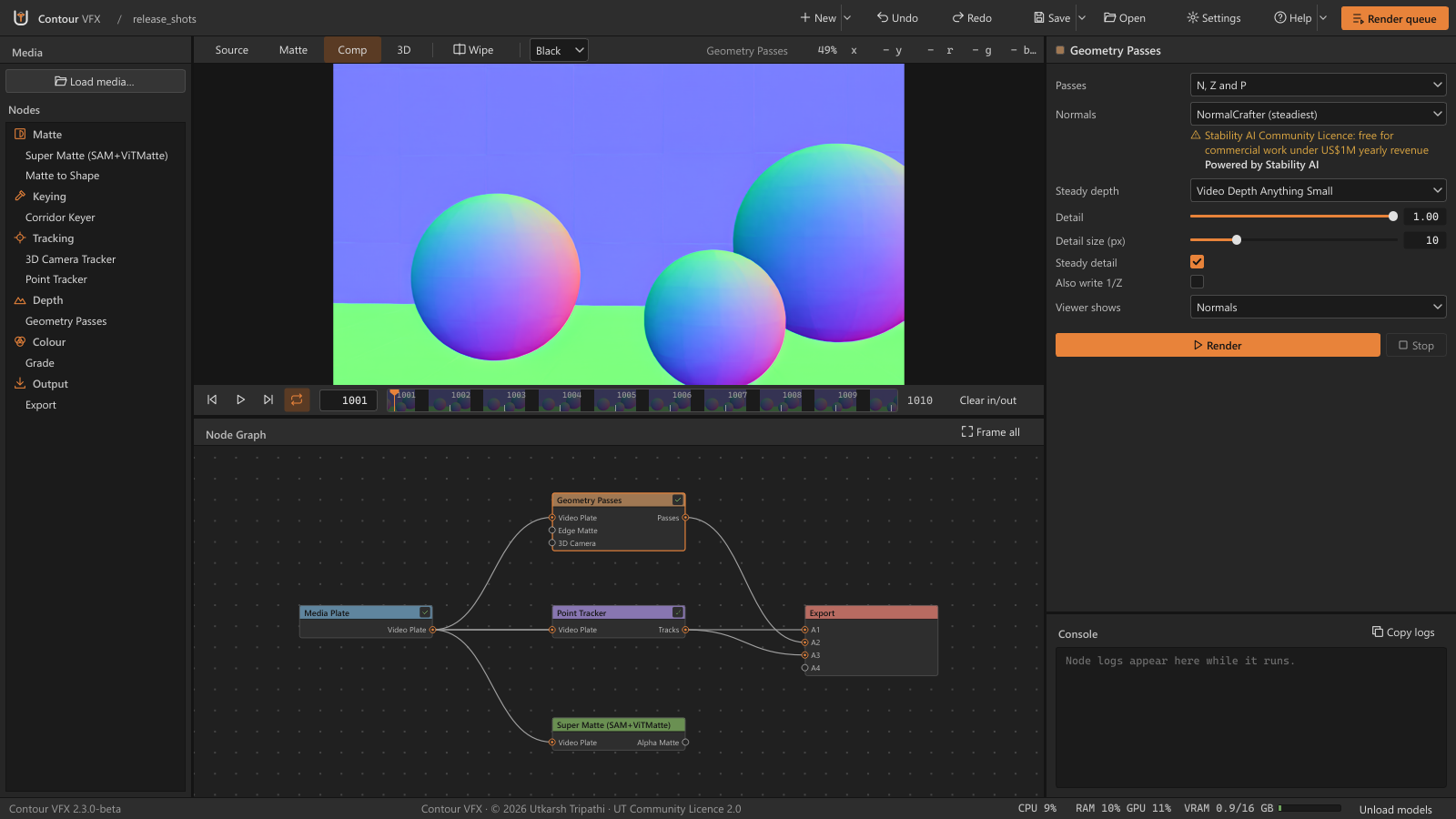
The passes a CG render gives, from a plate: normals (N), depth (Z, optional 1/Z) and position (P) in camera space, and in world space with a 3D Camera Tracker wired. Depth only is the quick setting.
NormalCrafterMoGe-2Video Depth Anything
Tracking
Point Tracker
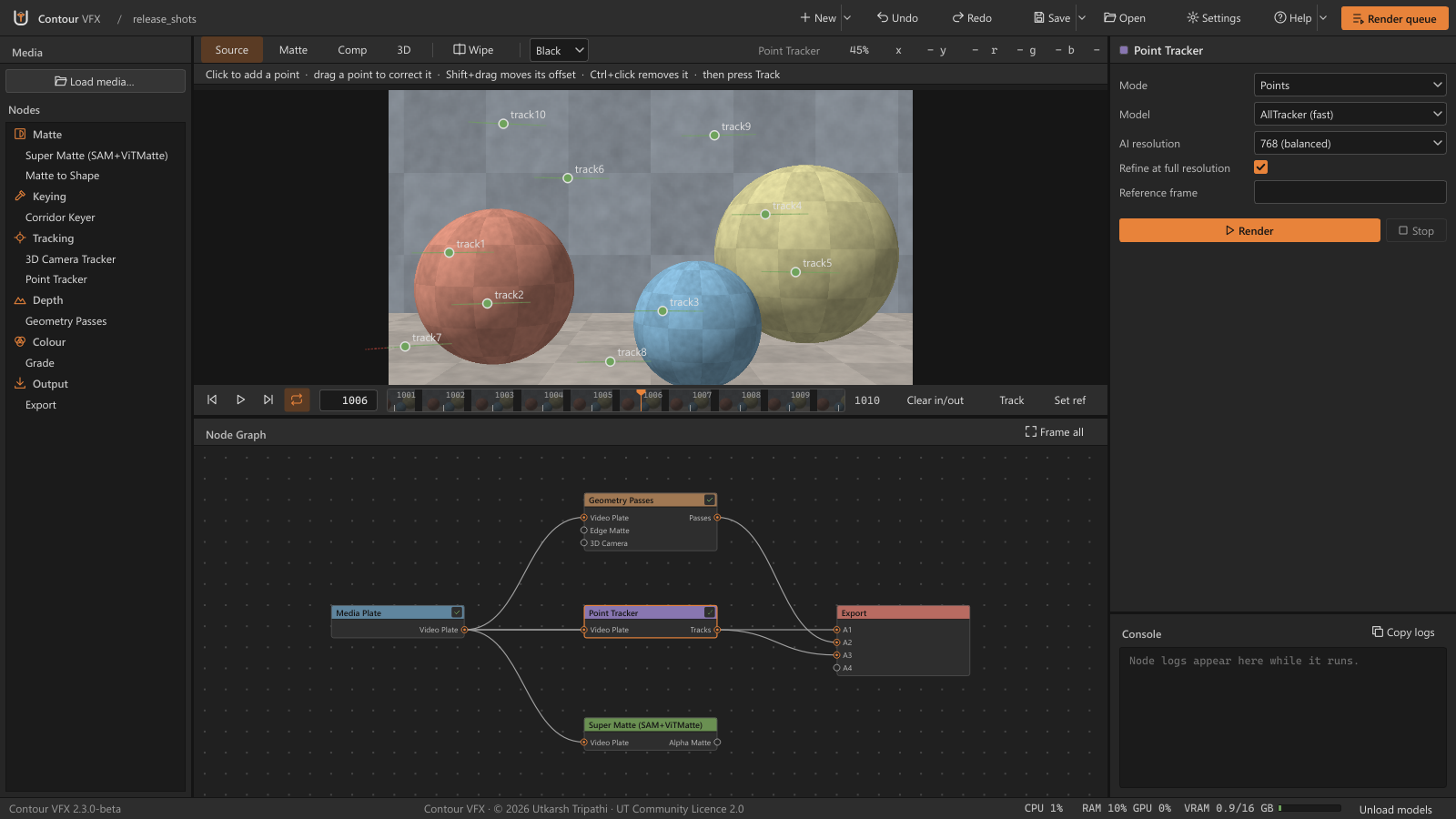
2D tracks for Nuke in Points, Corner Pin and Stabilise modes. Click to add points, one Track button, drag to correct. Polished at full resolution, and written as a Tracker4, CornerPin2D and Transform.
AllTrackerTAPNext++CoTracker3
Output
Export
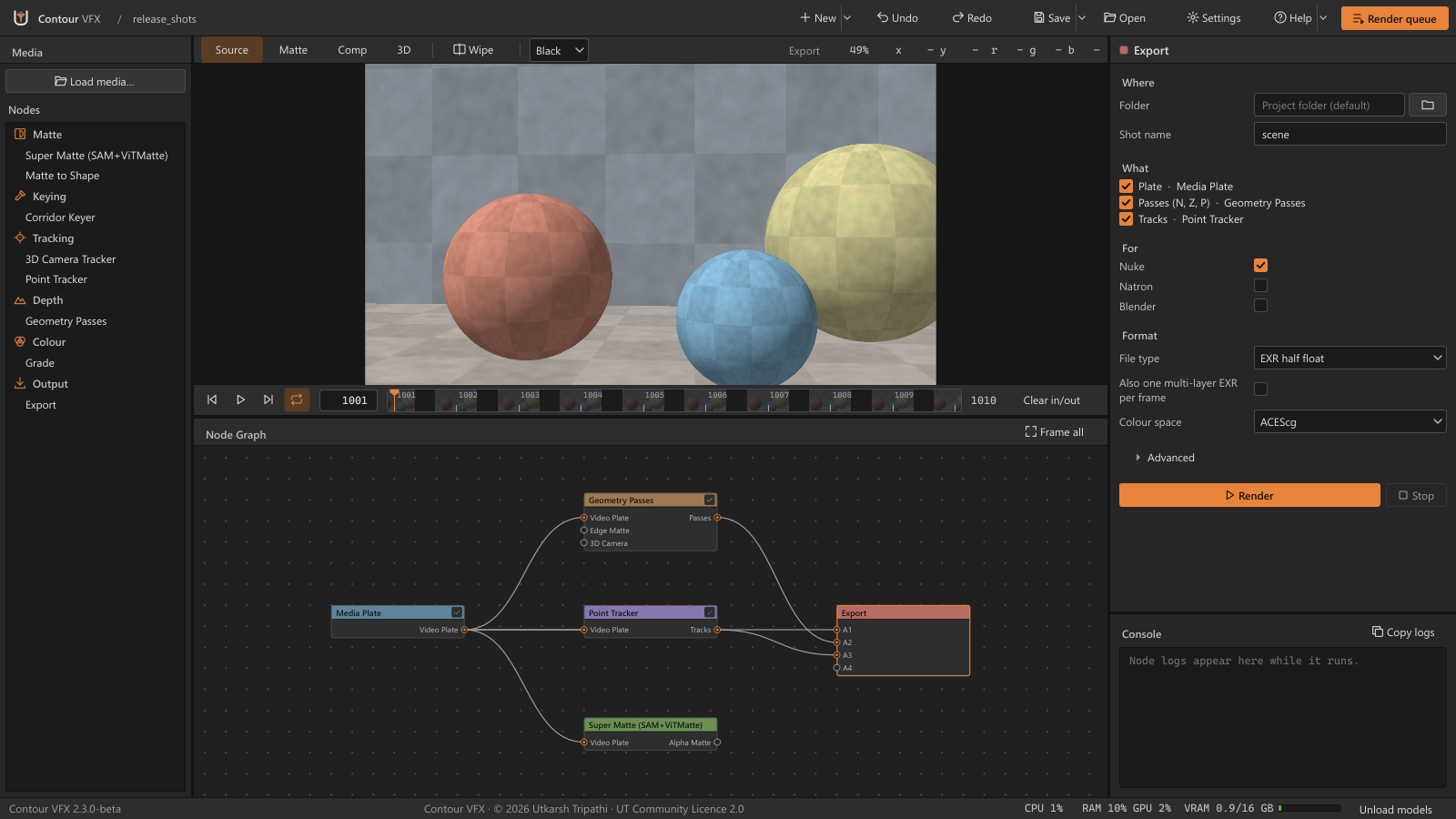
Delivers everything. Its inputs grow as you wire (A1, A2…), like Nuke's Merge, and it finds what each one is. Four short sections: Where (folder, shot name), What (tick what to write), For (Nuke, Natron, Blender) and Format (EXR layout, colour space).
Colour
The ACES studio OpenColorIO config. The working space is ACEScg and the viewer uses the ACES SDR view. Highlights above 1.0 are kept.
Frame numbers
Every file keeps the plate's own frame numbers: 1001 stays 1001. The timeline's In/Out limits every render.
Rendering
Renders are cached per node and redone only when something upstream changes. Stop, Freeze and Bypass work as in Nuke.
Gone in 2.3.0-beta: OCIO ColorSpace, Dot and Depth have left the node list, and Export replaces Unified Output. Old projects still open and render: a Dot becomes a direct wire, an old OCIO or Depth node keeps rendering, and an old Unified Output opens as Export and writes the same files.
A look inside
The app
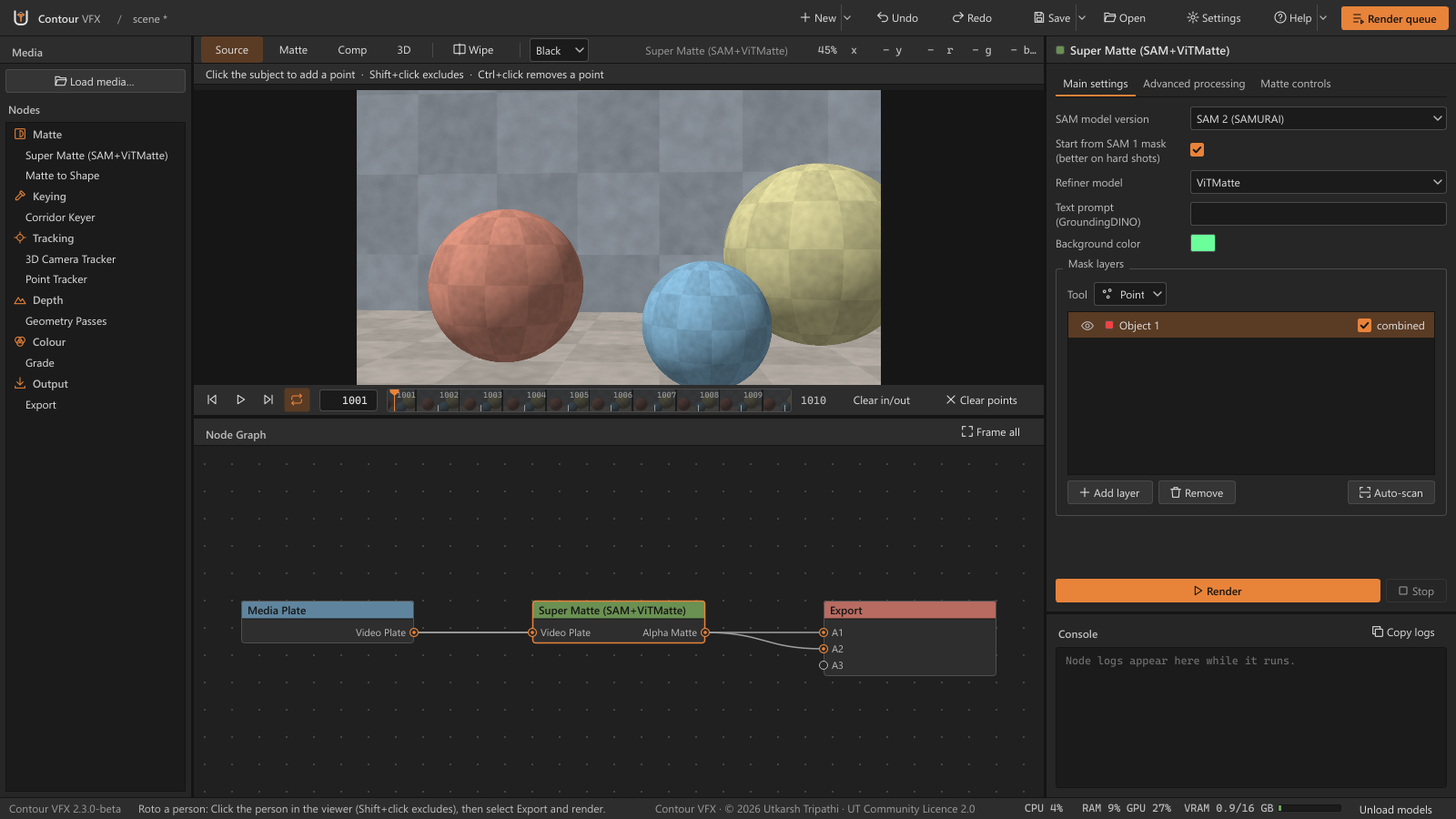
Node list on the left, viewer and timeline in the middle, the node graph below, and the selected node's settings and console on the right.
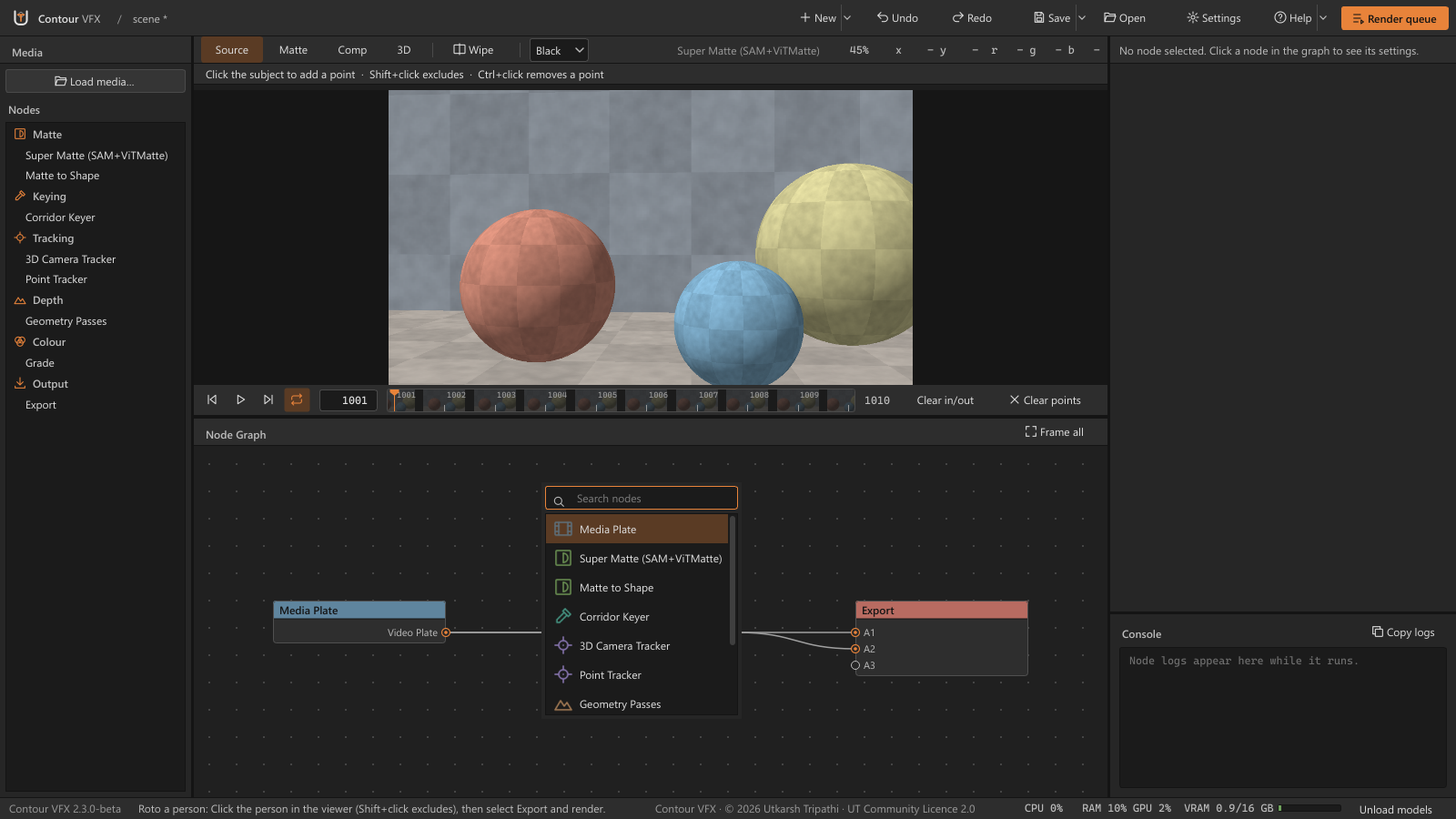
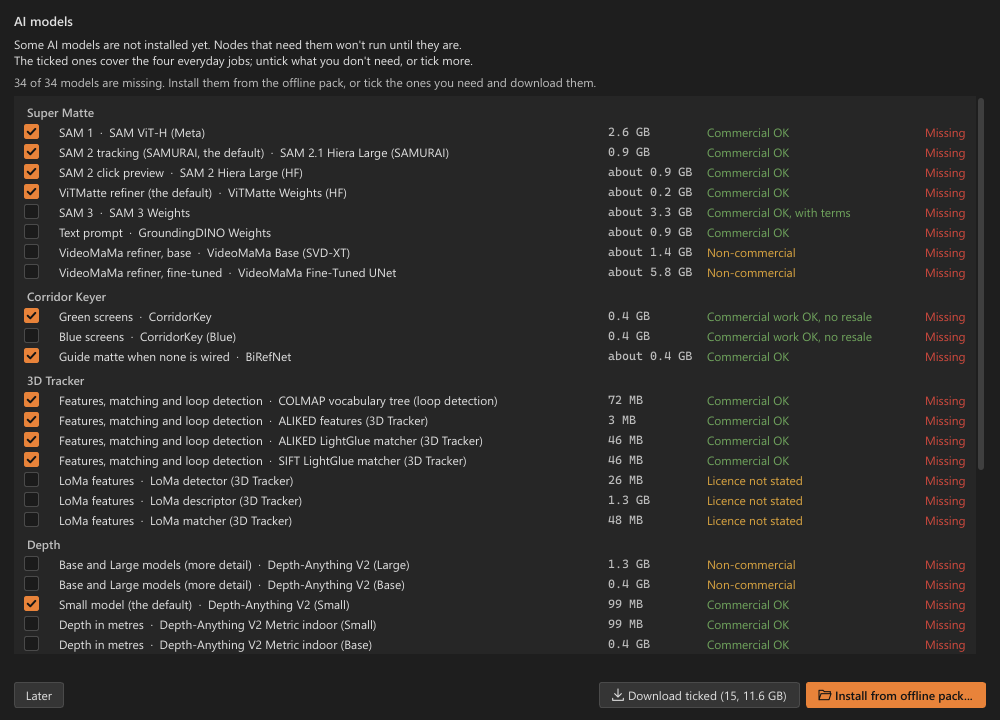
The main window. The “Roto a person” template: Media Plate into Super Matte, and both into Export. Super Matte’s settings on the right.Node based. Press Tab in the graph to search and add any of the nine nodes.Export. Where to write, what to write (here the plate, passes and tracks it found), for which apps, and in which format.Geometry Passes. The normals pass in the viewer; depth and position are written alongside.Point Tracker. Ten AllTracker tracks with their trails, ready for a Tracker4 in Nuke.AI models. On first start, pick what to download, or install from an offline pack. Each model shows its size and licence.
Quick start
Your first matte
Three nodes take you from a plate to a matte in Nuke or Blender.
Media Plate→Super Matte→Export→Nuke / Blender
01Load the plateClick Load media… above the node list and pick one frame of a sequence (EXR, DPX, TIFF, PNG…) or a video. A Media Plate node appears. You can also drop the file onto the graph.
02Add a Super MatteClick Super Matte in the node list (under Matte) and wire the Media Plate's Video Plate output into its Video Plate input.
03Click the objectSelect the node and click in the viewer. A click adds a point, Shift+click leaves something out, Ctrl+click removes a point. One layer per object.
04RenderClick Render at the bottom of the node's settings. It renders the matte for the whole shot, or the timeline's In/Out. Where the matte drifts, go to that frame and click again.
05ExportAdd it (under Output). Wire the Media Plate into A1 and Super Matte's Alpha Matte into A2 (a new input appears each time). Tick what to write under What, set Folder under Where (blank uses the project's exports folder), and click Render.
06Into Nuke or BlenderOpen the written _reads.nk in Nuke, or run the Blender import script for a camera. What gets written.
Straight into your comp
Getting results into Nuke and Blender
Export writes everything into its folder (by default the project's exports folder), and every file keeps the plate's frame numbers.
What
Where
How to use it
Plate, keyed RGBA, mattes, depth, geometry passes
<layer>\<shot>_<layer>.<frame>.exr
Mattes are in the alpha channel, depth in Z. Passes keep every channel (N, Z, P, and Nworld, Pworld with a camera) in full float.
A Read for every layer, the Roto node, and the Point Tracker's Tracker4, CornerPin2D and Transforms, all wired to the plate's Read
exports\nuke\<shot>_reads.nk
Open it in Nuke, or import it into your script. The passes Read is raw, with a note on Relight and PositionToPoints.
The Point Tracker's nodes on their own
exports\nuke\<shot>_tracks.nk
Copy everything, click in Nuke's node graph and press Ctrl+V: a Tracker4 with its match-move (or stabilize) baked in, plus a CornerPin2D or the stabilise and match-move Transforms.
Roto shapes (Matte to Shape)
exports\nuke\<shot>_roto.nk
Open it in a text editor, copy everything, click in Nuke's node graph and press Ctrl+V. A Roto node builds the animated shapes.
Tracks and roto for Natron and Blender
exports\natron\, exports\blender\
Natron: open the _natron.py script, or run it in the Script Editor. Blender: run <shot>_tracks_blender.py in the Scripting tab with the plate's clip open.
Camera and point cloud (3D Camera Tracker)
exports\tracking\
Nuke: open camera_track_nuke.nk (or load camera_track.chan into a Camera). Blender: open import_to_blender.py in the Scripting tab and click Run Script.
What was written
<shot>_export.json
Colour spaces and frame ranges of every layer.
Colour in Nuke
Colour layers (plate, keyed RGBA) are written in ACEScg by default (Export's Colour space, under Format). In Nuke, set Project Settings › Color › OCIO config to an ACES config, then set each colour Read's Input Transform to ACEScg. Mattes and depth are data: their Reads are set to raw, so leave them. The _reads.nk carries a note with the same steps.
Alembic, USD and .blend
Point Blender (for Alembic, USD and .blend), under Advanced on the Export node, at your blender.exe, and the camera is also written as tracking\camera_track.abc, .usd and .blend. Alembic and USD keep time in seconds, so set your scene to the plate's frame rate first.
What it needs
Requirements and GPU memory
The AI nodes run on an NVIDIA graphics card through PyTorch 2.5.1 with CUDA 12.1.
Windows
Windows 10 or 11, 64-bit. Installs for your user only; no administrator rights needed.
NVIDIA GPU
Driver 531 or newer (CUDA 12.1); the newest Studio or Game Ready driver is best. Without an NVIDIA card the AI nodes cannot run at a usable speed.
Disk
About 50 GB free: about 6 GB for the app, about 30 GB for the AI models, and room for renders.
RTX 50-series
Not supported on the GPU yet: this PyTorch has no code for Blackwell cards. The app tells you, then runs the AI nodes on the CPU, which is very slow. Support is planned for a later version.
Rough VRAM per node
Node
Rough VRAM (HD plates)
Media Plate, Grade, Export
little or none
Matte to Shape
< 1 GB AllTracker for point motion
Super Matte: SAM 1, SAM 2 (SAMURAI) or SAM 3, with ViTMatte or MEMatte
≈ 6–8 GB one model on the card at a time; click following peaks at about 4.2 GB
Super Matte with the VideoMaMa refiner
≈ 24 GB slow on a 16 GB card
Corridor Keyer
≈ 10 GB at Processing Resolution 2048; much more at 4096
3D Camera Tracker (COLMAP)
≈ 2–4 GB about 4.5 GB with Use AI Tracks
Geometry Passes
≈ 10–15 GB with NormalCrafter at 1024 px; with less free it runs smaller and says so in the log. Depth only needs about 3 GB
In short: 8 GB is enough for most nodes on HD plates, 12 GB or more is comfortable, 16 GB runs Geometry Passes at full quality, and VideoMaMa wants a 24 GB card. These are rough guides from the model sizes and the project's notes, not tests on every card; bigger plates and higher settings need more. The app's footer shows the card's VRAM use while you work.
Get it
Download and install
The installer holds the app and its Python environment. The AI models (about 30 GB) are not in it: some model licences do not allow sharing them, so they are downloaded from their official sources during setup.
Download every file from the latest release: the setup .exe and the .bin file(s) next to it.
Keep them in the same folder and run the .exe. It installs to %LOCALAPPDATA%\Programs\Contour VFX for your user only, with no admin rights.
The installer is not code-signed yet. If Windows shows “Windows protected your PC”, click More info → Run anyway.
Get the models. On the last page, leave Download AI models ticked. It resumes if interrupted and checks every file. Or do it later from Start menu › Contour VFX › Download AI models.
Start Contour VFX from the Start menu and load a plate.
Already have an earlier 2.x version with its models? Install over it: the models are kept, and only the new ones are downloaded.
ContourVFX_Setup_2.3.0-beta.exe ContourVFX_Setup_2.3.0-beta-1.bin(and any further .bin)
Download them together. The installer cannot work without the .bin files beside it.
Offline model pack
For PCs without internet. An offline model pack comes as 2 GB ZIP parts (ContourVFX_Models_2.3.0-beta.zip.001, .002, …). Install it from the installer's Offline models page, or AI models › Install from offline pack in the app. Every file is checked against its SHA-256.
The pack is for your own computers only: please don't upload it, because some model licences forbid that.
Two models need a step from you
SAM 3 is gated: request access at facebook/sam3 on Hugging Face and sign in before downloading it.
MEMatte (a Super Matte edge refiner) is only shared on Google Drive: download it by hand, see MODEL_DOWNLOADS.md.
Everything else works without them.
Licences
Free to use. Not for sale.
Contour VFX is under the UT Community Licence 2.0. The AI models it runs keep their own licences, and a few of them are for non-commercial use only.
UT Community Licence 2.0, in plain words
Free to use on any number of computers, also for paid studio and client work.
What you make is yours: the images, mattes, cameras and roto are yours to use as you like.
Not for sale: Contour VFX, or a changed copy, may not be sold, rented or charged for.
Changes come back: if you change it and use or share it, keep the name as Contour VFX (modified by …) and send your changes as a pull request within 30 days.
Keep the credits: the credit line at the bottom of the window and the Credits screen stay, or the app will not start.
Copies up to 2.0.0-beta keep the Contour VFX Share-Back Licence 1.0. Read the full licence.
Model
Limit that still applies
Depth Anything V2 Base and Large (optional, for old projects' Depth node)
Non-commercial (CC BY-NC 4.0). Small and all six metric models are Apache-2.0.
VideoMaMa refiner (Super Matte)
Non-commercial: code CC BY-NC 4.0; weights and Stable Video Diffusion XT under the Stability AI Community Licence. Powered by Stability AI.
NormalCrafter (Geometry Passes' default normals)
Built on Stable Video Diffusion: Stability AI Community Licence, free under US$1M yearly revenue. Powered by Stability AI. Normals “From the steady depth” avoids it.
CoTracker3 (Point Tracker, optional)
Non-commercial (CC BY-NC 4.0).
GVM (Corridor Keyer)
Non-commercial (CC BY-NC-SA 4.0).
CorridorKey (Corridor Keyer)
Processing images for commercial projects is allowed. It may not be resold, redistributed, put in a competing product or offered as a paid API.
SAM 3 (Super Matte)
Meta's SAM Licence: commercial use allowed, with conditions.
Everything else, including SAM, SAM 2, SAMURAI, ViTMatte, GroundingDINO, BiRefNet, MediaPipe, MoGe-2, Video Depth Anything, AllTracker, TAPNext++, ALIKED, LightGlue and COLMAP, is under a permissive licence. MEMatte's and LoMa's authors do not state a licence for their weights. FFmpeg (GPL-3.0) ships as a separate program. Full list: THIRD_PARTY_NOTICES.md.
Questions, bugs and ideas: GitHub Issues or capsuleutkarsh@gmail.com. Please attach the log, your graphics card and what you clicked, but never footage.